Create Your GitHub Account
To begin using GitHub, you’ll need to create a free account. This account will serve as your identity across the platform, allowing you to contribute to projects, publish your own repositories, and collaborate with others. Follow these steps carefully:
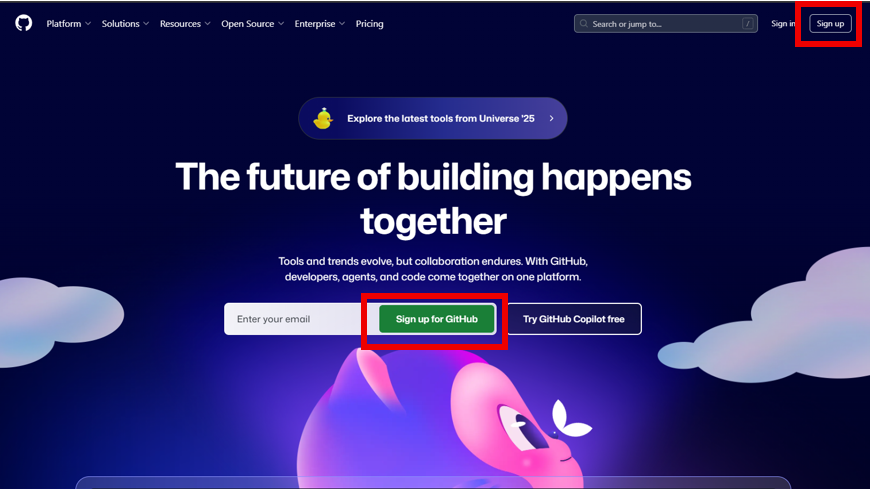
- Go to github.com.
- Click the Sign up button in the top-right corner to to "Sign In", or the green button in the middle of the page next to "Enter your email".
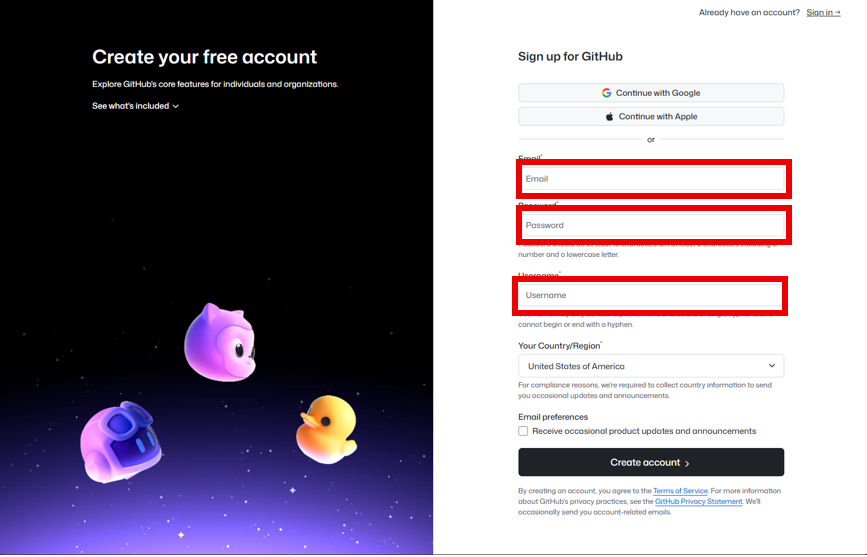
- Enter the required fields starting with an email and suitable password.
- Choose a unique username. This will be your GitHub identity and will appear in repository URLs.
- Verify your account by solving a puzzle of your choice. (Visual or Audio).
- You will promptly receive an email with your GitHub Launch Code.
Once you're done, you'll be taken to your GitHub dashboard. This is where your journey begins.
Continue to the Interface Tour
Now that your account is ready, you can begin exploring GitHub’s interface. Visit the Interface Tour to learn how to navigate the platform and discover where key features are located.