What Is a Repository?
A repository (or “repo”) is a dedicated space on GitHub where your project lives. It stores your code, documentation, images, and other files. Repositories also track changes over time, making it easy to collaborate and manage versions. Think of it as a digital folder that not only holds your files but also remembers every change you make.
You can choose to make your repository public (visible to everyone) or private (visible only to you and selected collaborators). Public repositories are great for open-source projects, while private ones are useful for personal work or team projects that aren’t ready to be shared.
How to Create a Repository
Follow these steps to create your first repository:
- From the profile dropdown, click on Repositories.
- Once on the repositories page, click on the green new button.
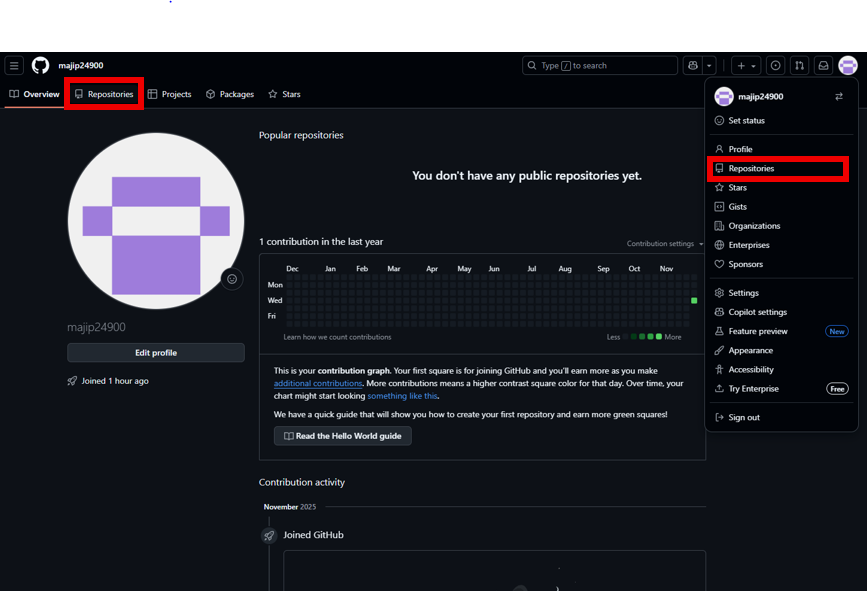
- Enter a clear and descriptive name for your repository (e.g.,
my-first-project). - Optionally, add a short description to explain what your project is about.
- Select either Public or Private visibility.
- Check the box to Initialize this repository with a README.
- Click Create repository.
Why Add a README?
The README.md file is the first thing visitors see when they open your repository.
It explains what your project does, how to use it, and any other important details.
Think of the README as your project’s front door. It welcomes visitors and tells them why your work matters.
Tips for Naming Your Repository
- Use lowercase letters and hyphens (e.g.,
github-tutorial). - Keep it short but descriptive, so others know what the project is about.
- Avoid spaces or special characters, which can cause issues in URLs.
- Choose a name that reflects the purpose of your project.
A clear name makes your repository easier to find and understand. It also helps when sharing links with collaborators or potential employers.
Continue to File Management
Now that your repository is created, you’re ready to upload and manage your files. Visit the Managing Files page to continue. There, you’ll learn how to add new files, edit existing ones, and organize your project effectively.